
Set Priority for Net Payment Term Rules
Set Priority for Net Payment Term Rules feature enables you to control which payment term rule takes precedence when multiple rules could apply to the same customers or orders. By defining rule priority, you ensure that the most important payment terms are applied first, resolving any conflicts automatically.
Overview
- Rule Priority: The payment term rule at the top of the list has the highest priority. Rules lower on the list are applied only if no higher-priority rule applies.
- Conflict Resolution: When multiple Net Payment Term rules are triggered at the same time, the rule with the highest priority is executed first.
How to Set Priority for Net Payment Term Rules
Follow these steps to manage and set priority for your Net Payment Term rules:
Step 1: Access the “Set Priority for Net Payment Term Rules” Section
- Log in to your Shopify admin.
- Navigate to the Net Payment Terms section.
- Click the Set Priority for Net Payment Term Rules button.
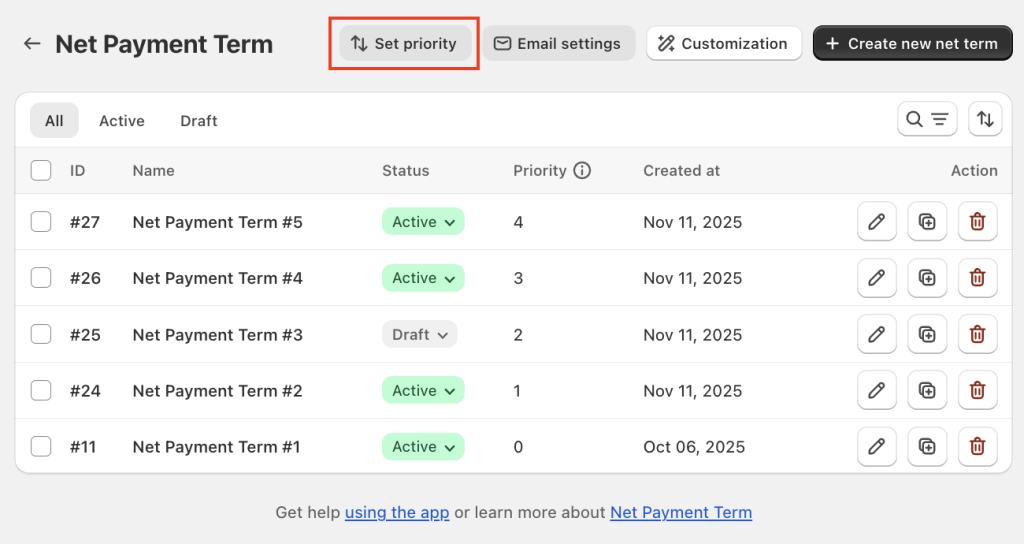
Step 2: Change Rule Priority
To adjust the priority:
- Click and hold the Net Payment Term rule you want to move.
- Drag it to the desired position in the list.
- Drop it in place to reorder the rules.
- Higher-priority rules should be placed at the top of the list, while lower-priority rules are placed below.
- Use Up and Down icons to quickly adjust the order of the rules.

Step 3: Save Changes
Once you have arranged the rules in the desired priority order, click the Apply button to save your changes. The system will automatically update the rule execution order based on your new priorities.
Example Use Case:
You have two Net Payment Term rules:
- Rule A: Applies Net 30 to customers whose order value is more than $500.
- Rule B: Applies Net 15 to all customers.
If both rules are triggered for the same customer, you can set Rule A (Net 30) as the higher priority. This ensures that Net 30 is applied first, overriding Net 15 in case of a conflict.
By using the Set Priority for Net Payment Term Rules feature, you can effectively manage overlapping payment terms and ensure the correct rule is always applied.
If you have any further questions or need assistance, our support team is here to help 24/7.
You can reach out to us via live chat or by emailing support@massyapp.io