Import Order Limits Rules
This guide explains how to import the Order Limits rules including detailed steps, features, and functionality.
To import custom pricing rules via a CSV file, follow these steps:
Step 1: Navigate to Order Limits
Go to the Order Limits section in your Shopify admin.
Step 2: Open Import Modal
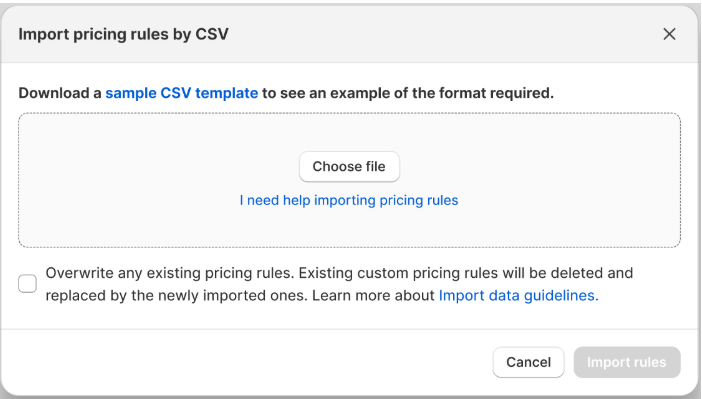
Click the Import rules button to open the Import pricing rules by CSV modal.
Step 3: Upload CSV File
- In the modal, click the Choose file button to upload your CSV file.
- (Optional) Download the Sample CSV template by clicking the provided link to ensure your file is formatted correctly.
Step 4: Validate the File
Once a file is uploaded, the system will validate it against the import data guidelines:
- If the file is invalid: An error message will appear stating, “Some values in your file are currently missing or incorrect. Please refer to our sample template above to make sure your file is valid.”
- If the file is valid: A success message will appear stating, “File successfully validated!”
- At this point, the Import rules button becomes enabled and clickable.
Step 5: Overwrite Existing Rules (Optional)
Check the box labeled Overwrite any existing pricing rules if you want to replace all current rules with the ones from your file.
Step 6: Import Pricing Rules
Click the Import rules button to upload and apply the new pricing rules.