
How to enable Massy extension on your store?
When you install our app, the Massy app extension is automatically added to your store’s theme, but the special pricing and discount rules won’t be visible until you enable the extension in the theme editor.
Here’s how to enable the Massy extension:
- Install Massy from the Shopify App Store
- Enable the Massy extension on your Shopify store
- Set up and activate your pricing or discount rule on the Massy dashboard
- Ensure that the special pricing or discount rules are displayed correctly
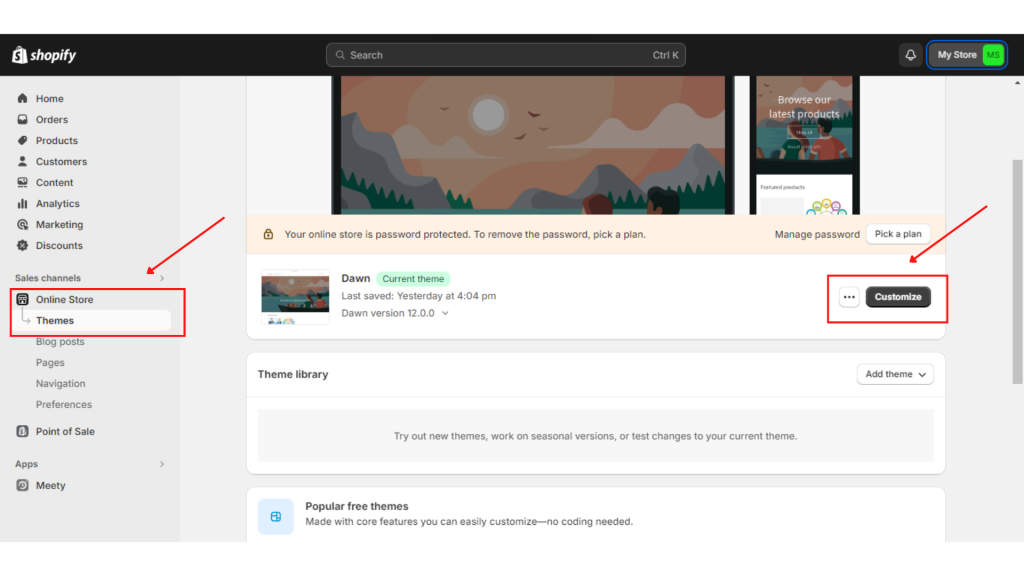
Step 1: Access the Theme Editor
To access the theme editor, you can Go to Shopify admin > Online Store > Themes > Click Customize on your current theme.
Step 2: Enable the Massy Extension
After opening the theme editor:
- Go to the App Embeds section in the left sidebar.
- Find the Massy extension and toggle it on.
- Click Save to apply changes.

Step 3: Activate Your Pricing or Discount Rules
Once the Massy extension is enabled, ensure your pricing and discount rules are active:
- Go to the Custom Pricing tab in the Massy app.
- Click the Edit Rule button for any rule you’ve created.
- Toggle on the Active status at the top-right corner.
You can also click the View in Store button to preview how the pricing or discount rules are displayed in your store.

Note:
Occasionally, it might take a few minutes for the settings to update, and the special pricing or discount rules will appear on your store.
If you have any further questions or need additional help, our support team is here to assist you 24/7! You can reach out to us through live chat, or by emailing support@massyapp.io.